
How the Chippewa County Court Calendar Works
No single calendar covers Chippewa County. The trial courts and their divisions each keep their own schedules. A result from one court never speaks for the rest. For District settings, the 91st District Court docket page is the local starting point. Click Calendar there. You can sort the view by date or week, and by judicial officer. The 50th Circuit Court, Probate Court, and Juvenile or Family Division run separate records functions. Read each Chippewa County court calendar on its own terms.
A calendar only tells you when and where a case is set. The complete procedural record is a different thing. Under Michigan Court Rule 8.119, that record is the case history. Use the calendar to find a hearing. Go to the court of record when you need filings, orders, or the whole file. Keep timing in mind, too. A hearing can move, come off public display, or be sealed while the case stays active.
Chippewa County Calendar First Click
On the District Court calendar page, entries sit grouped under three names: Hon. Eric G. Blubaugh, Magistrate Elizabeth Chambers, and Magistrate Roxanne Bosley. Pick your date first. Then pick the officer. An empty view means very little. A Chippewa County court schedule can read "Nothing Scheduled" for one officer on one day. The same case can have a setting in another courtroom, division, or court level.
The official County docket source shows this entry point and its officer headings. It is a calendar view. It is not a complete case file. Treat it as a starting screen for docket search rather than the whole record.
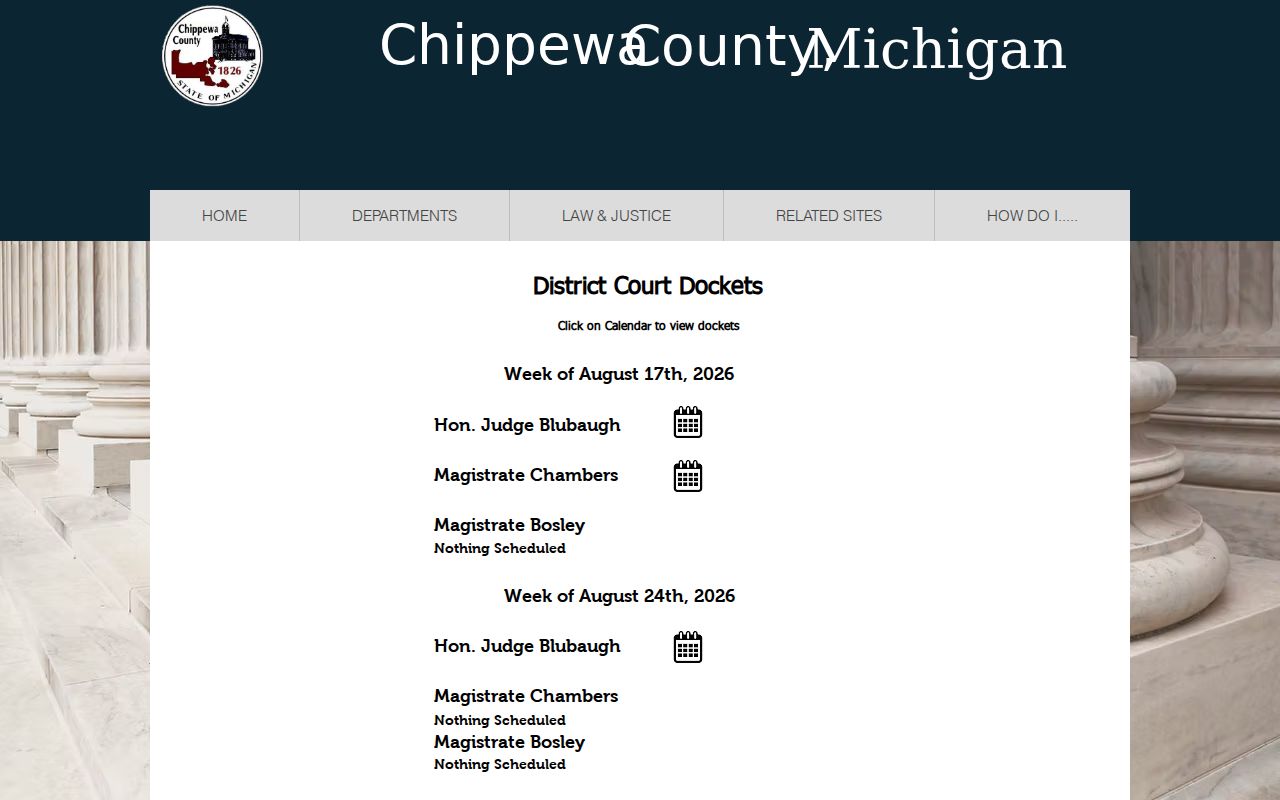
Use the Chippewa County calendar picture for orientation only. The live court source is where you confirm today's settings, since the correct date and officer matter for attendance details.
Note: When a Chippewa County calendar shows nothing scheduled, write down the exact date, court, and officer you checked before assuming the matter has no hearing.
Chippewa County Court Date Lookups
Your case notice comes first. Its case number and court name shrink a Chippewa County docket search from guesswork to a targeted lookup. From there, several online channels help. Options include the County District calendar, a published calendar PDF, the MiCOURT public calendar, and the Circuit Court page links. Need an answer on an urgent Chippewa County setting? Call the clerk or check the courtroom calendar, since those remain the confirmation channels. Circuit dockets also appear on courthouse kiosks. A notice or clerk contact can confirm a specific hearing by phone, mail, or email.
- Identify the Chippewa County court, division, and case number from the notice or prior filing.
- Check the District calendar or MiCOURT calendar for the selected date, then read the time, room, and party or case fields shown.
- For a Circuit setting, check the courthouse kiosk display in the basement or outside the second-floor courtroom, or ask the Circuit clerk to confirm the schedule.
- Call the relevant clerk when the hearing is urgent, a PDF is dated earlier than the notice, or the calendar has changed. Use the attorney of record for party-specific direction.
Each Chippewa County court has its own phone line, so call the right one. The 50th Circuit Court sits at 906-635-6338, the 91st District Court at 906-635-6320, Probate at 906-635-6314, and Juvenile at 906-635-6316. The county offers no general public calendar email subscription.
Chippewa County Calendar Field Comparison
Two calendars can describe the same Chippewa County hearing and still look nothing alike. The Division 1 PDF lays out columns. You get TIME, EVENT, CASE #, PARTY, ATTY, CHG/CSE, and TYP. MiCOURT takes a different approach. Its fields are Party Name, Time, Room, Case Number, plus buttons for moving between dates. Treat the PDF as a field map. It is not proof that any dated copy is still current. Keep the case number and other identifying fields when you save a docket entry. Leave private party names off anything you publish from a calendar.
| Calendar source | Visible fields | Best use |
|---|---|---|
| 91st District Court calendar | Date or week, officer, and scheduled-state view | Local District Court settings |
| Division 1 PDF sample | TIME, EVENT, CASE #, PARTY, ATTY, CHG/CSE, TYP | Reading a printed docket layout |
| MiCOURT public calendar | Party Name, Time, Room, Case Number, date controls | Statewide calendar cross-check |
| Circuit kiosk display | Local docket display | In-person Circuit scheduling check |
The official calendar PDF sample backs up that field list. It is still just a sample. The court's mailed notice and a confirmation from the clerk come first.
Court Settings: What Each Field Means
One setting on a Chippewa County calendar is one scheduled court event. The listed "Time" is when the calendar slot begins. It is not a promise that your case starts at that minute. "Room" points you to the courtroom where the docket places the matter. The event label names the proceeding type. It could be an arraignment, a pretrial, a hearing, or a trial. Then comes the case number. That thread ties the entry to the case history. It also links to any copy you ask the clerk to pull.
| Date | The selected Chippewa County calendar date for the setting. |
|---|---|
| Time | The time displayed for the event or docket call; confirm it against the notice. |
| Room | The MiCOURT room field or the courtroom location identified by the local court. |
| Judicial officer | The judge or magistrate heading used by the District calendar. |
| Event or type | The proceeding label, charge or case field, and type code where the local calendar shows them. |
A calendar entry does not prove every filing or outcome. For the fuller record, the case history held by the court clerk is what public inspection covers.
Chippewa County Circuit Calendar Kiosks
Skip the printed lists. In Chippewa County, the Circuit schedule lives on courthouse kiosks. The 50th Circuit Court page points you to them. One sits in the basement. Another stands outside the courtroom on the second floor. For a docket check you can do yourself, these displays beat a phone call, and they give the Chippewa County Circuit calendar a hands-on route that District Court does not share. District Court, for its part, offers a public access computer instead. When a screen leaves your question open, take it to the clerk counter.
One caution applies. A kiosk is there for reading the court docket. It is not for copying or recording what happens in the courthouse. The County device policy permits silent devices in courthouse areas. They remain subject to directions from the court. It also regulates photography, audio, video, livestreaming, recording, and contact with courtroom participants. Follow what security and the judge tell you, every time.
When a Court Date Moves
Chippewa County court dates move. A continuance, reset, or outright cancellation can leave a printed notice out of step with the live calendar. Courts here post no fixed update interval for local postings. The public entry you see may be rescaled, sealed, removed, or shown differently in the court's internal system. So treat any dated printout as a starting point.
Check the court and date again right before the hearing. Call the clerk when the gap matters. Follow the notice and your attorney's direction. Do not assume a dated PDF controls what happens. A hearing that disappears from the calendar was not necessarily dismissed. The scheduled event and the case history stay separate records under the court rule. Confirm any Chippewa County calendar change with the court that maintains the setting. Do this before a party acts.
Chippewa County Remote Court Settings
The 50th Circuit holds some settings by Zoom. The court's Zoom instructions list meeting ID 3861556181, telephone access at 646-876-9923, and Polycom address 144.195.19.161##3861556181. Still, a connection option does not make every Chippewa County setting remote. The judge controls the proceeding and may give different directions for an individual matter.
Test your equipment well ahead of time. Join from a private, quiet room. The instructions prohibit joining from a car, outdoors, or any public place. A separate courthouse device policy restricts recording, photography, video, audio, livestreaming, and communication with courtroom participants. Those limits govern remote participation. They also govern courtroom observation alike. They are conduct rules rather than optional technology suggestions.
Missed Settings and What Comes Next
Miss a setting in Chippewa County? Contact the court that scheduled it right away. Use the case number when you ask. The right response depends on the case type, any order already entered, and the judge's direction. A District criminal or traffic matter may need a different clerk contact than a Circuit, Probate, or Juvenile matter. Keep in mind that a public calendar cannot decide whether an absence was excused or a new setting granted.
Missed a Setting? Missing a Chippewa County court date can lead to consequences set by the court, including a failure-to-appear process, so contact the clerk or attorney immediately.
Use the court notice and case number to ask for the current setting and any instruction already entered by the judge.
Get legal advice from a licensed attorney for a missed Chippewa County setting before assuming that a calendar entry resolves the matter.
Chippewa County Court Calendar Limits
One name, many calendars. Chippewa County splits its court work across several divisions. The 50th Circuit Court takes felony criminal matters, larger civil cases, family matters, and appeals. The 91st District Court handles misdemeanors, traffic, civil infractions, small claims, and preliminary felony proceedings. Probate and the Juvenile or Family Division keep separate functions. Many juvenile and child-protective matters carry confidentiality boundaries.
A calendar only says when and where a matter is set. The case history records the procedural events. For anything beyond the schedule, the court of record controls. Need a public case number or a fuller event record? Use the County's Chippewa County Docket Search route. Then ask the responsible clerk for copies.